


Updated November 2026: the steps now match Stash today. Aerial maps are the Metromap Aerial add-on, owner names come from the National Property Data add-on, and nearby DAs are on the Development Activity page.
Beat the crowds and find the best property deals before they hit the market!

You’ve most likely heard success stories of finding properties even before they are for sale – but how can you do this yourself and fast?
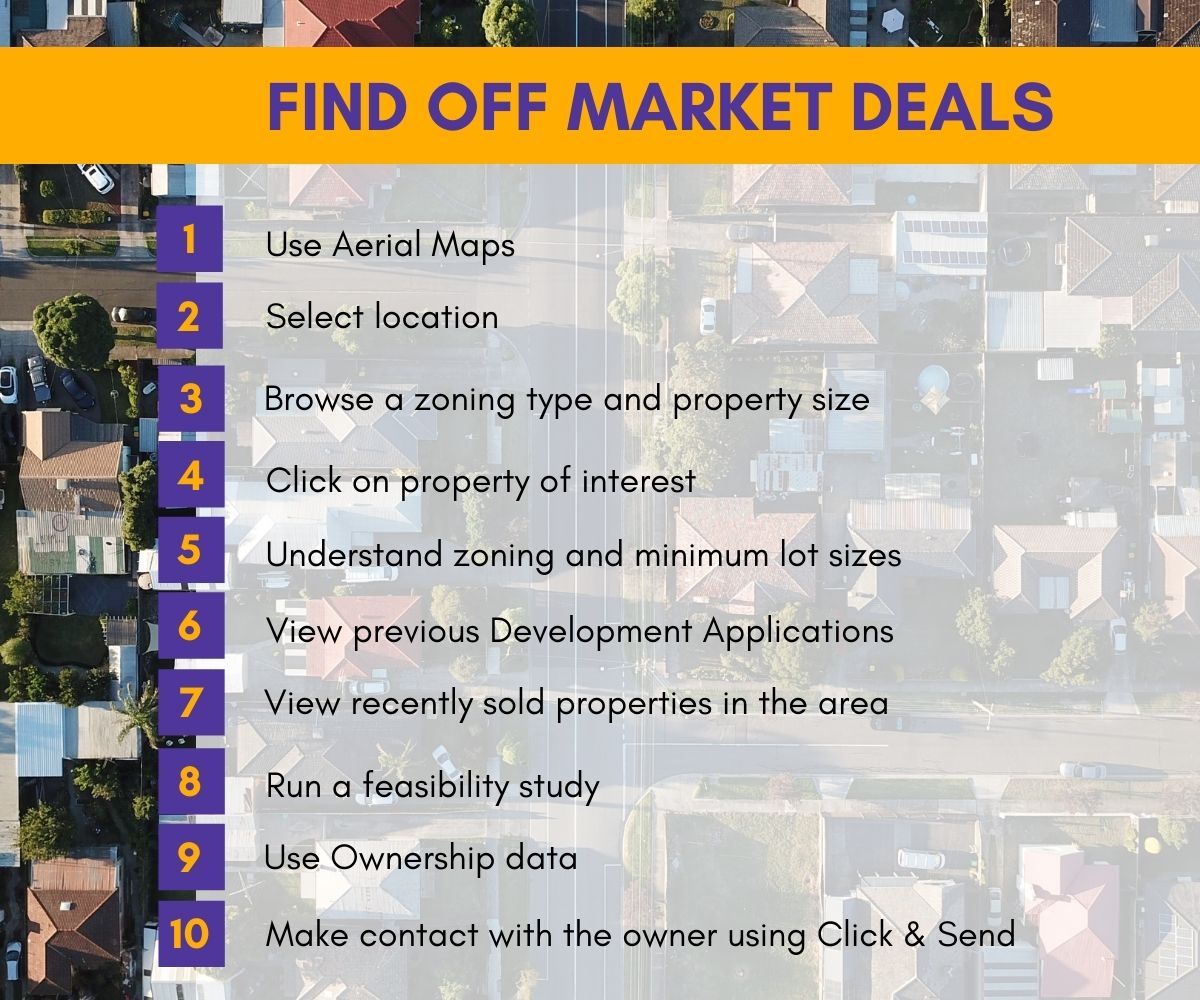
10 steps to finding profitable properties before they are listed for sale
- Use aerials maps
- Use Metromap Aerial (a paid add-on, included on some free trials) to view recent aerial imagery of many properties at once instead of older satellite imagery, from your desktop or mobile. Open Layers and switch it on under Basemaps, then zoom in to street level. A date picker lets you step back through earlier captures. See Turn on recent aerial imagery and Go back in time with aerial imagery.
- Select a location you’re interested in exploring
- In choosing your desired suburb, you need to consider the nearby infrastructure and future developments in the area. It would be good to check if there are new start-up businesses in the neighbourhood as they often choose low rental fees, but then, this attracts more start-up businesses, and will eventually grow the neighbourhood. These can be early signs of an area on the way up, though nothing guarantees future value growth. Hotspots can help you shortlist suburbs by growth, yield and vacancy.
- Browse a certain zoning type and property size
- Choose your desired zoning type and target property size to make it easier for your research. In Stash, open Search all properties (Find Prospects for real estate and property services accounts) in the side menu, tick zones under Property Zoning and set the land Area and Street Frontage (m). See Find off-market properties.
- Click on a property of your interest
- Once you’ve selected your chosen suburb, search through the map and look for a property with a great location, or anything that matches with your criteria.
- Understand zoning and minimum lot sizes
- This is one of the most important things to consider when finding off-market properties. You need to understand the zoning and minimum lot size required to know what you can do to the property. You can either do a splitter block, townhouse, house, or even a business centre. It depends on your strategy. Good news is, with Stash, you can check these on the property’s Planning Insights tab, or click VIEW PLANNING INFO on the Property Details tab (see Minimum lot size and zoning details). Read our Back to Basics blog if unsure!
Back to basics: 7 core knowledge areas every Property Investor should know
- View previous Development Applications
- It is worth checking the nearby development applications to further understand what type of development may be possible in your target location. In Stash, the Development Applications card on the Planning Insights tab opens the Development Activity page, where you can search within 1km to 5km or the whole suburb. See Development applications.
- Check recently sold properties in the area
- By viewing recent comparable sales, you will then be able to know the value of different types of properties in the area. In Stash, open Comparable Properties from the side menu under CURRENT FOCUS. See Comparable sales.
- Run a feasibility study
- Using the Stash feasibility calculator (on the property’s Due Diligence tab), you can assess if your selected property is a good deal or not, and whether you are likely to make a profit or a loss. See Run a feasibility study. With that in mind, you can easily plan your strategy on your selected property.
- Use Ownership Data
- Owner names come from the National Property Data add-on (or a connected Pricefinder account), shown on the property’s National Property Data card. You can trial it free first. See View owner details. Make contact to explore if the owner is interested in selling.
- Make contact with the current owner
- You can contact the property owner by personalising a letter template in Stash, then printing it yourself or sending it through the Stash mailhouse. See Print letters to owners and Mail out letters.
If you’re not yet ready to progress further with the property, use Metromap Aerial to track developments in the area such as building infrastructure or housing that may impact your future development. Or you can also save the property, add a reminder to review or connect with the owner at another time with Stash auto-reminders.
Interested in learning more about aerial maps or ownership data? Check out our plans and add-ons here or contact us at learn@stashproperty.com.au.
Happy Stashing!