

Your feasibility is only as good as its sale prices. Instead of guessing what each new block or dwelling will sell for, you can attach a saved comparable sales search to a design. Stash uses its median price as the Retail price per block and keeps the link for reference.
Before you start
You’ll need a saved comparable sales search near the property. If you haven’t used comparable sales before, see Advanced comparable sales search.
1. Save your comparable sales
- Search for comparable sales. Open Comparable Properties and set your filters to match what you plan to build, for example new 4-bedroom houses on similar lot sizes.
- Click ADD TO MY COMPARABLES. The Save Results dialog opens.
- Name your results and click Save. Choose a name that describes the area or filters, such as “New 4 bed houses, Coorparoo”. Your search is added to the MY COMPARABLES tab, where you can open it again later.
2. Attach it to your feasibility
- Open the feasibility. Open the property, go to the Feasibility card on the Due Diligence tab, and click Create new feasibility or a saved feasibility.
- Find the design. In the Property Details section, go to the design under Proposed development.
- Click Populate from comparable. It sits next to Retail price per block. The Comparables list dialog opens with your saved comparables near this property.
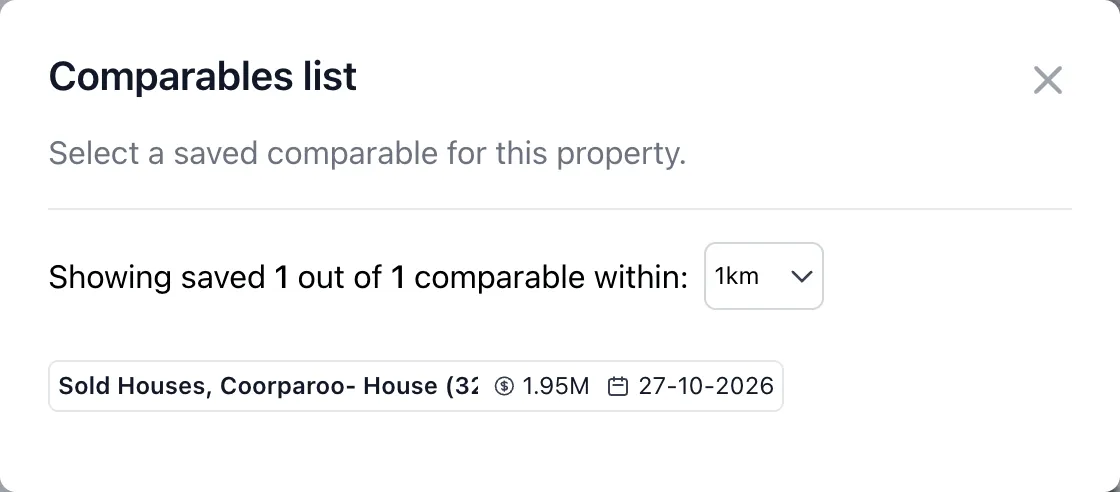
- Widen the search if you need to. The list shows saved comparables within 1km to begin with. Choose a bigger radius, up to 50km, to see more.
- Choose a comparable. Click the one you want. Stash fills in the Retail price per block with its median and shows it under Attached comparable, with its name, median and the date you saved it.
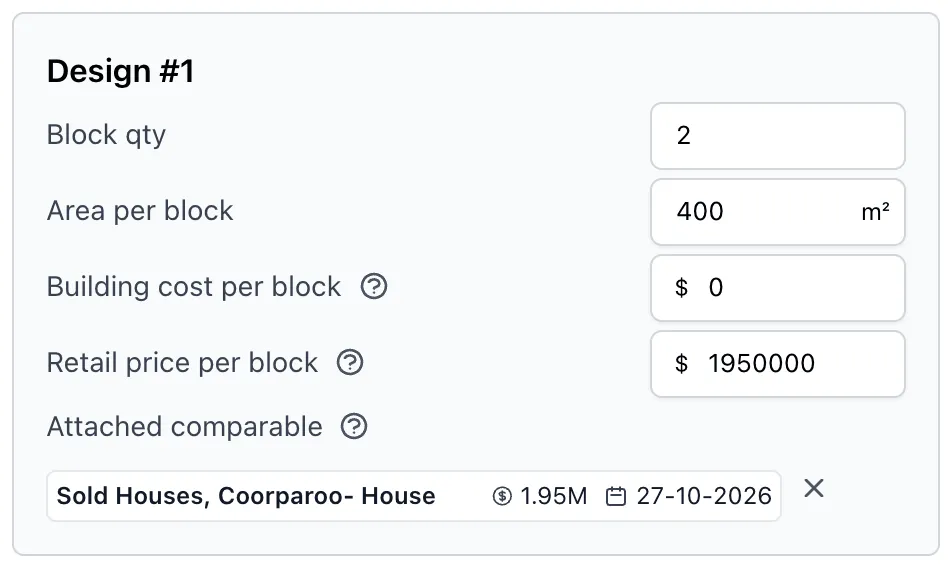
- Repeat for each design. If you’ve added more designs with Add design, attach a comparable that matches each one.
- Save the feasibility. Click SAVE FEASIBILITY. Save a feasibility study.
To switch to a different comparable, click the attached comparable and choose another. To remove it, click the cross next to it. The retail price stays as it is, so you can change it by hand.
Comparables set the retail price of what you’ll sell. For the price of the site itself, click Calculate median per sqm next to Purchase price. Stash estimates it from recent house sales nearby on similar land sizes.
Troubleshooting
“No saved comparables found for this property and surrounding area”
You haven’t saved a comparable sales search within the selected radius. Choose a larger radius, or click the link in the message to search and save one.
“Not Enough Comparable Sales were found to calculate a purchase price”
Calculate median per sqm couldn’t find enough similar sales nearby. Search comparables yourself or enter your own purchase price.