

Patch, by Stash, shows real estate agents what’s in their database: how much of each suburb you hold, who lives in those homes, how long they’ve owned them and what they’re worth. Use it to see where your coverage is thin and who to call next. In Stash you’ll find it as Database Insights.
Before you start
- A real estate agent account in Stash. Database Insights is in the MY PATCH section of the side menu.
- Your properties in your Property Pipeline. Database Insights analyses the properties in your pipeline.
Database Insights is being rolled out to real estate agents. If you don’t see it in your side menu yet, contact us.
Bring your database into Stash
- Open your pipeline. In the side menu, choose Property Pipeline.
- Click Connect property data.
- Upload a CSV. Choose Upload CSV and add a file exported from your CRM, with columns for street address, suburb and postcode. Download template gives you the right layout. Files can be up to 10MB.
- Check the mapping. Under Column mapping, confirm which of your columns is the Street address, Suburb and Postcode. CRM last updated and CRM reference are optional.
- Tag the import. Under Import settings, choose a status and tags to apply to every property.
- Import. Click Import CSV. Stash matches each row to a property. Review the matched rows and any Rows left out, then click Finish import. You can close the dialog while it runs.
Direct connections to agency CRMs are coming soon. See Connect your CRM.
Read your insights
- Open Database Insights. In the side menu, choose Database Insights. The header shows how many properties are in your database.
- Filter (optional). Use All suburbs and All property types to focus on part of your patch.
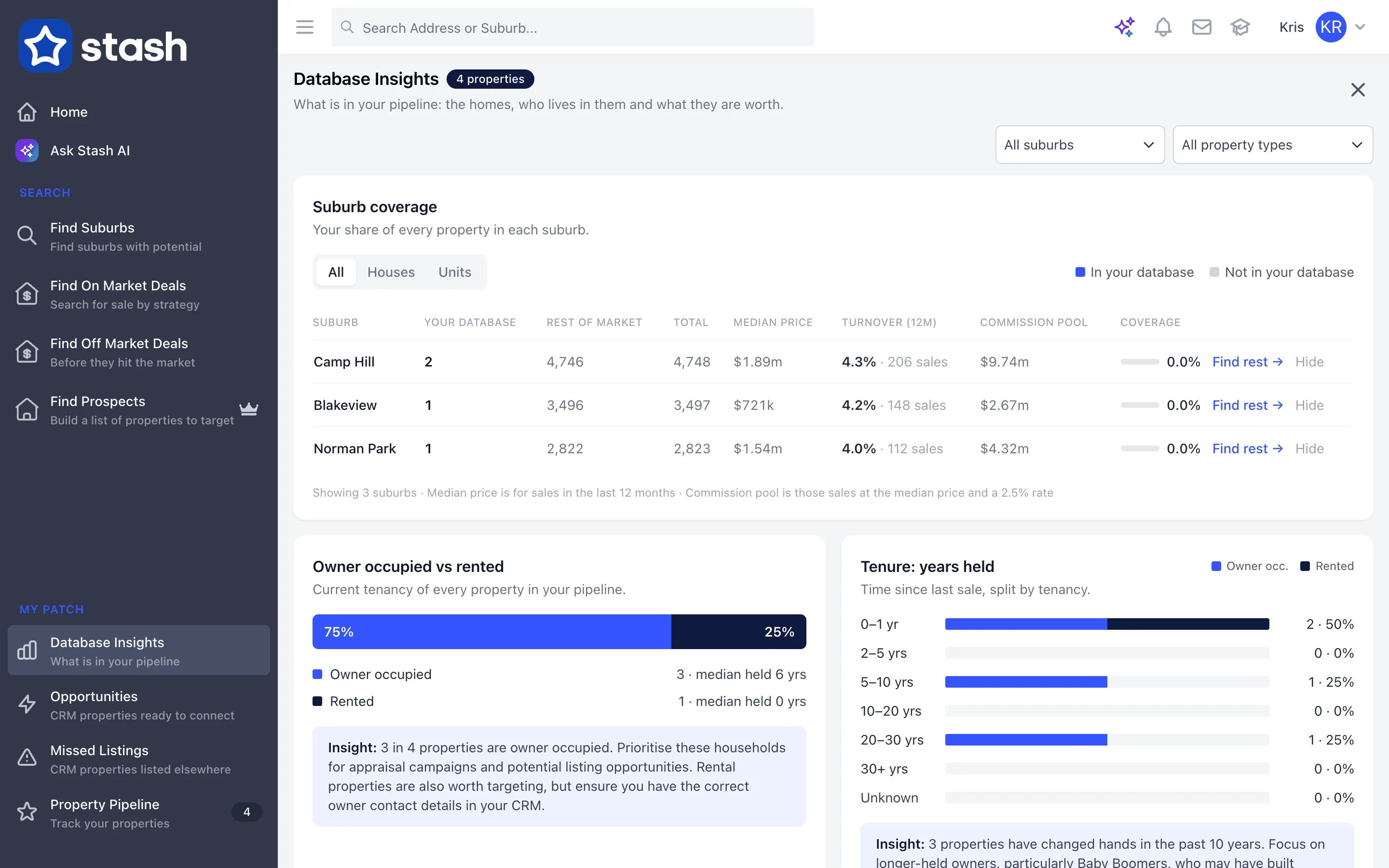
- Check your suburb coverage. The Suburb coverage table shows your share of every property in each suburb. Switch between All, Houses and Units. For each suburb you’ll see:
- Your database and Rest of market, and the Total
- Median price and Turnover (12m), the number of sales in the last 12 months
- Commission pool: those sales at the median price and a 2.5% rate
- Coverage: your share of the suburb
- Find the properties you don’t have. Click Find rest → on a suburb to open a property search for that suburb, ready to build a prospect list. Click Hide to remove a suburb from the table, and Show hidden to bring it back.
Understand who’s in your database
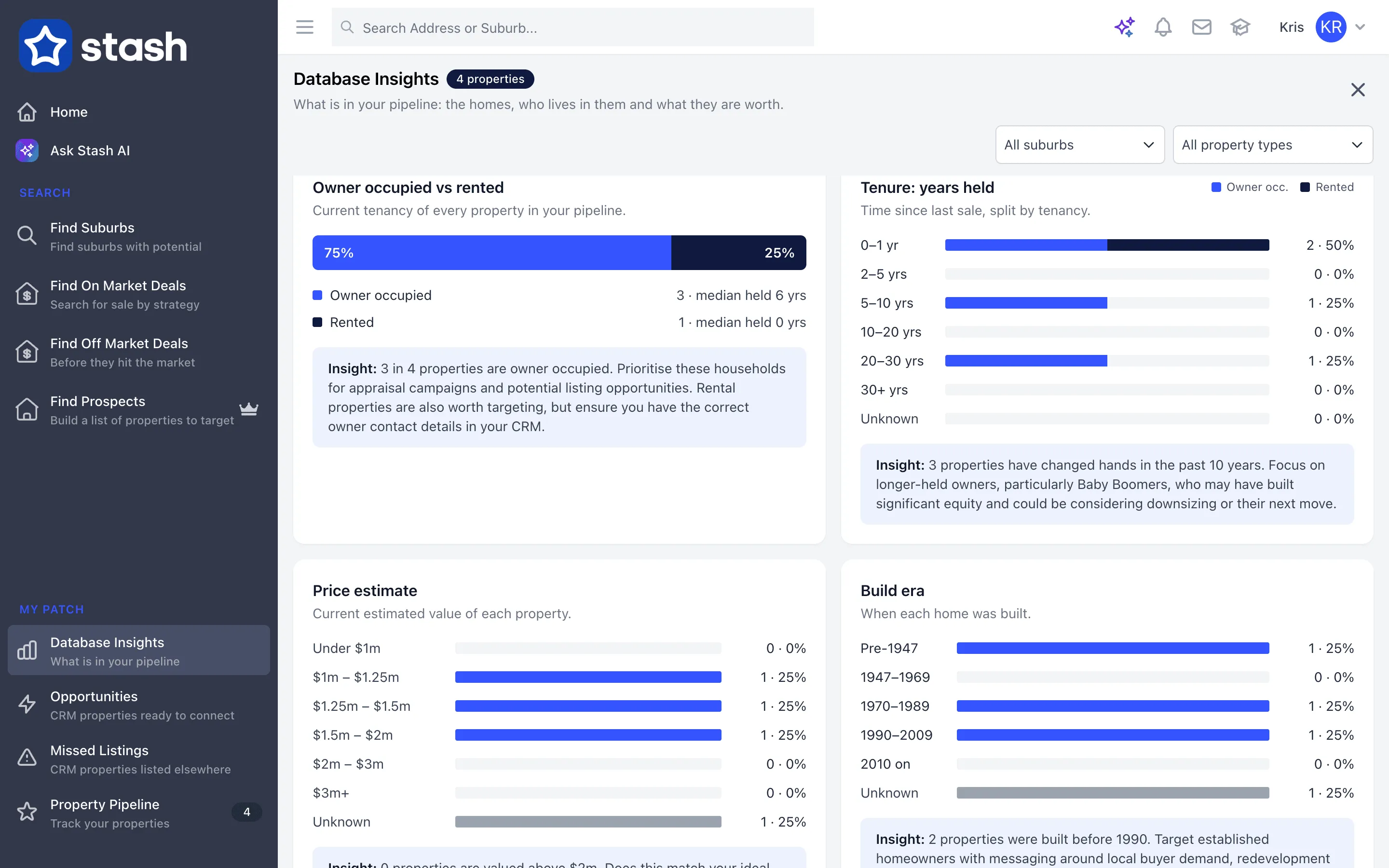
Below the coverage table, cards break down your database, each with a short Insight:
- Owner occupied vs rented: the current tenancy of every property.
- Tenure: years held: time since the last sale, split by tenancy. Long holds are often worth a call.
- Build era: when each home was built.
- Price estimate: the current estimated value of each property.
- Property type: the mix of houses, units and other types.
Save the properties you want to target to your pipeline, then send them a letter. See Contact multiple owners with Mailhouse.
Common questions
Why are some of my properties missing?
Rows that couldn’t be matched to a Stash property are left out of the import. Check the address, suburb and postcode in your CSV and import them again.
Where do the figures come from?
Values and tenure use Stash property and sales data. Commission pool is an estimate based on the suburb median and a 2.5% rate. See Where Stash sources its data.