

The Stash API gives your own software structured property, suburb, sales, planning and risk data across Australia, as clean JSON. Use it to power address lookups, appraisals, CRM enrichment or AI agents. You create and manage your keys in Stash.
Before you start
- A paid Stash subscription. Integrator API keys aren’t available during the free trial. If you need trial access, contact support.
- The team owner, or an account that isn’t part of a team. Team members can’t create integrator keys.
Choose how you want to connect
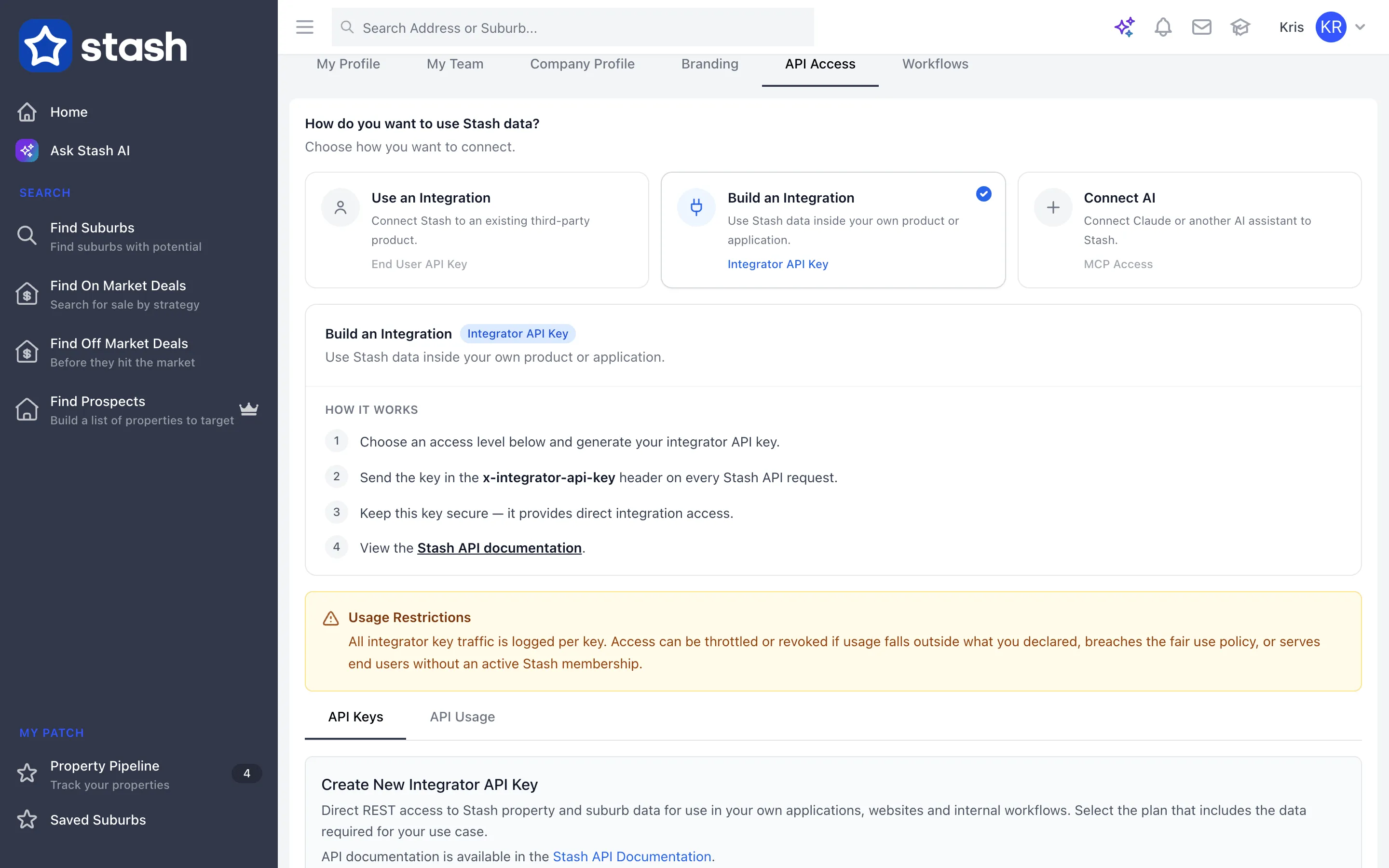
Go to My Profile, then the API Access tab. Stash asks How do you want to use Stash data?:
- Use an Integration (End User API Key): connect your Stash account to an approved third-party product. See Connect your CRM.
- Build an Integration (Integrator API Key): use Stash data inside your own product or application. This article covers this option.
- Connect AI (MCP Access): connect Claude or another AI assistant. See Connect Stash to Claude.
Create an integrator API key
- Open the API Access tab. Click your name at the top right, choose My Profile, then open API Access.
- Choose Build an Integration.
- Choose an API plan. Pick the level that includes the data you need. The table below the selector shows what each level includes.
- Level 1 — Property & Suburb Lookup: predictive property and suburb search, and property attributes. Active straight away.
- Level 2 — Suburb-Level Data: adds nearby sales activity, suburb statistics and suburb charts. For internal workflow use only.
- Level 3 — Property & Suburb Data: adds on/off market status, property images, floorplans and price estimates (AVM). For internal workflow use only.
- Generate the key. Click Generate API Key, then fill in the Key name, what you’re building, your Platform and stack, and any CRM or other tools it connects to.
- Copy and store the key. Stash copies the key to your clipboard. Keep it secure, as it provides direct integration access.
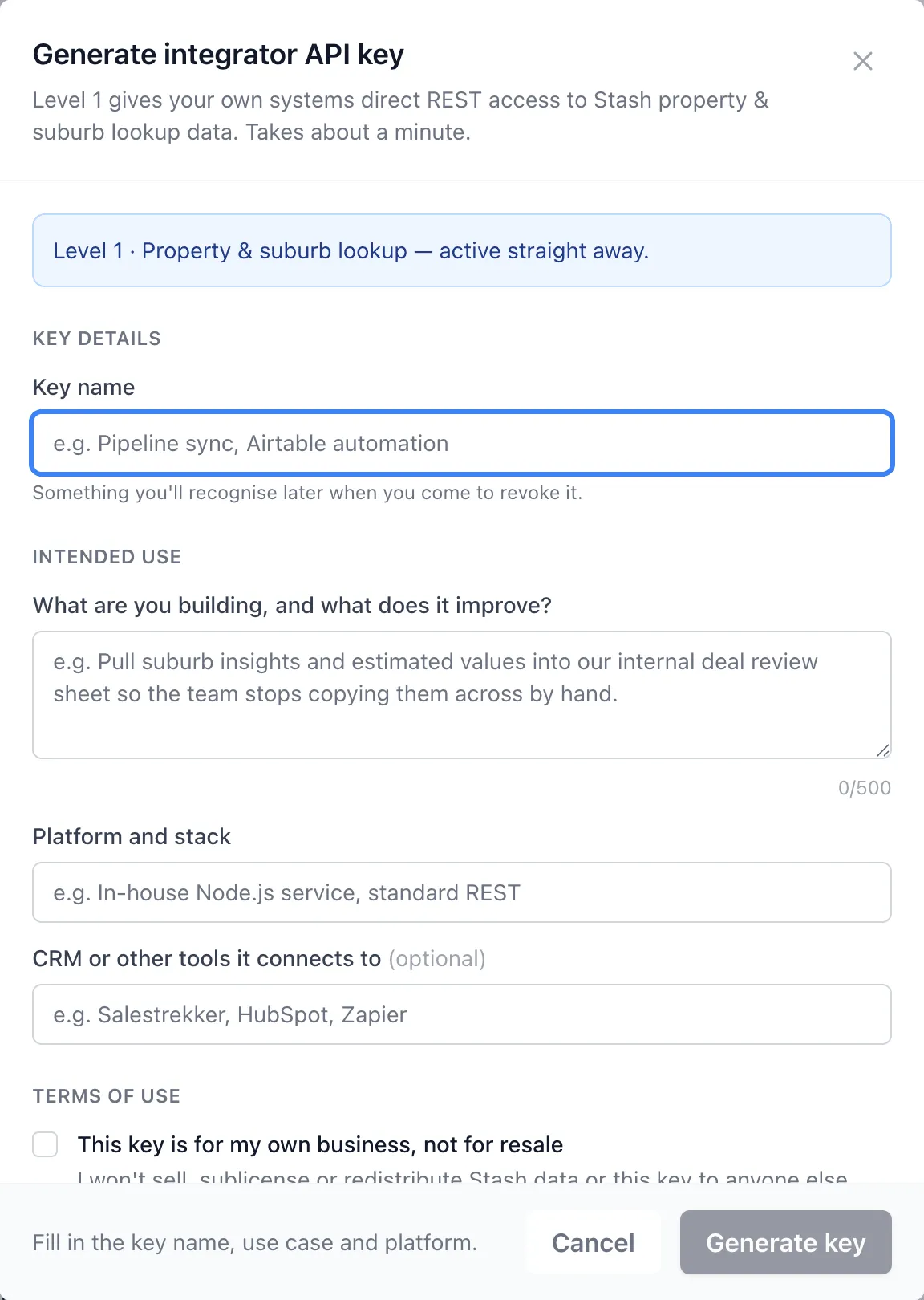
Level 2 and Level 3 keys work straight away for 72 hours while we review your use case. Our support team will contact you.
Make your first request
Send your key in the x-integrator-api-key header on every request. For example, a predictive address search:
curl -H "x-integrator-api-key: YOUR_KEY" \
  "https://stashproperty.com.au/app/api/v2/data/properties/suggest?address=27%20Wattlebird%20Crescent%20Coorparoo"
The full list of endpoints, parameters and responses is in the Stash API documentation, linked from the API Access tab. Some requests also accept your account API key as a Bearer token or x-api-key header; the documentation shows where.
What you can call
Endpoints are grouped by the data they return, including:
- Lookup:
/properties/suggest,/suburbs/suggest,/properties/geocode - Property profile:
/properties/{propertyId}with basic, extended and detailed versions - Estimates and sales:
/properties/{propertyId}/avm,/market-activity/sales - Suburbs:
/suburbs/{localityId}/statistics,/suburbs/{localityId}/timeseries,/suburbs/{localityId}/demographics,/statistics/hotspots - Planning and risk:
/properties/{propertyId}/planning-info,/properties/{propertyId}/risk-overlays - Reports:
/generateReportfor PDF reports and/generateUrlfor shareable live report links
Your API plan level decides which endpoints a key can use.
Track and manage your keys
- The API Keys tab lists your keys. Copy a key, or delete it at any time to revoke access.
- The API Usage tab shows usage for this month or last month.
All integrator key traffic is logged per key. Access can be throttled or revoked if usage falls outside what you declared, breaches the fair use policy, or serves end users without an active Stash membership.
Common questions
The Generate API Key button is greyed out
Integrator keys need a paid subscription. See plans, or contact support to ask about trial access.
I’m on a team and can’t create a key
Integrator keys can only be created by the team owner or accounts that aren’t part of a team. Ask your team admin.
Can I use the API with AI tools?
Yes. To plug Claude or ChatGPT straight into Stash, use Stash MCP. See Connect Stash to Claude.