


Updated November 2026: the feature list and steps now match the current Stash feasibility calculator, which you open from the Feasibility card on a property's Due Diligence tab. The video below shows the 2020 version.
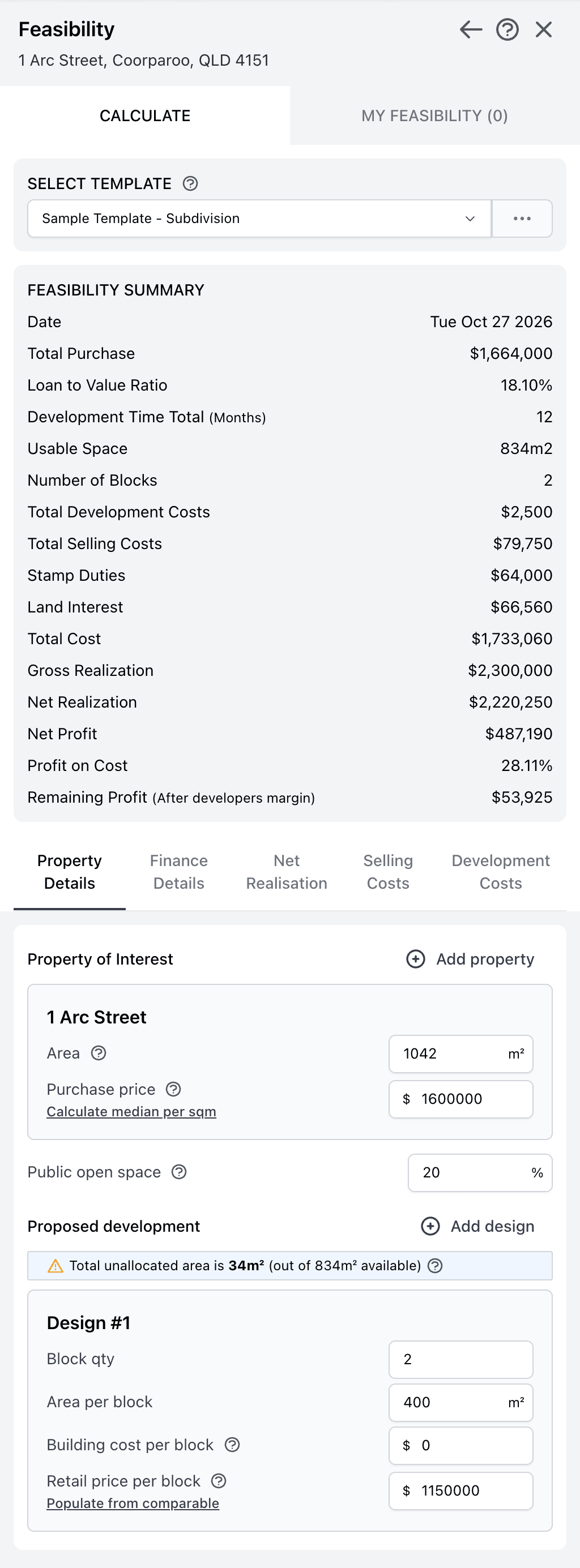
Quick answer: an instant feasibility study is a fast first check of whether a development site makes money. You enter the purchase price, what you plan to build and your costs, and the calculator shows total cost, net realisation, net profit and profit on cost. In Stash it runs on any property on the map, with the land area filled in for you.
Why we need Feasibility study?
Before you start your project, you need to perform a detailed feasibility study to make sure whether a site or deal is actually profitable i.e. “Do the numbers stack up?”.
Your feasibility is only as good as your numbers, so you need to make sure to give precise and accurate figures. Many times one feasibility is not enough and it is best to run different scenarios to maximise the potential use and profitability of the site/deal. You will also need to list credible sources and real market samples which give you accurate figures to work with.
This process could be time-consuming and error-prone. Most likely, you will use Excel spreadsheet and copy and paste values from different sources.
While there is nothing wrong with this approach, there are better ways. Meet our feasibility calculator!
The Stash feasibility calculator is a quick way to test property deals. We designed it for the Australian market, so you get pre-populated property details and nearby sales information in one place. The default values are a starting point only: change them to match your own cost estimates for the area.
Feasibility Calculator features:
- Run and save several scenarios against the same site, such as a subdivision against townhouses
- Set your finance, net realisation, selling costs and development figures as reusable templates
- Compare sites quickly: leave the calculator open and click another property on the map to load it for the new site
- See the Feasibility Summary (total cost, net profit, profit on cost) update as you type
- Start from the Stash default template, model a mix of lot or dwelling sizes with Add design, or save your own templates
- Estimate the purchase price with Calculate median per sqm from recent nearby house sales, or use comparable sales for the retail price
- Export to Excel or add the results to a Property Report
How to run a feasibility in Stash today
- Open the property. Search for the address, click it on the map, or open it from your Property Pipeline.
- Go to the Feasibility card. Open the Due Diligence tab, scroll to Feasibility under Resources and click Create new feasibility.
- Choose a template. Under Select Template, pick the template with your preset figures.
- Enter your numbers. Add the purchase price and the proposed development (block quantity, area, build cost and retail price per block), then work through Finance Details, Net Realisation, Selling Costs and Development Costs.
- Check the summary and save. When the Feasibility Summary looks right, click SAVE FEASIBILITY and name it.
Full steps are in the Help Centre: Run a feasibility study and Save a feasibility study. Feasibility is a premium feature, so check it’s included in your plan.
A feasibility in Stash is an estimate for research, not financial advice. Confirm costs, contributions and planning rules with council, your builder and your advisers before you commit to a site.
Watch this video (recorded in 2020, so the screens look different today) to see how to run feasibility scenarios in just a few clicks: