

You can view and download invoices for your Stash subscription, add-ons, and print and postage payments yourself from the Billing Centre.
Download an invoice
- Open the Billing Centre. Click your name at the top right of Stash, then choose Billing Centre.
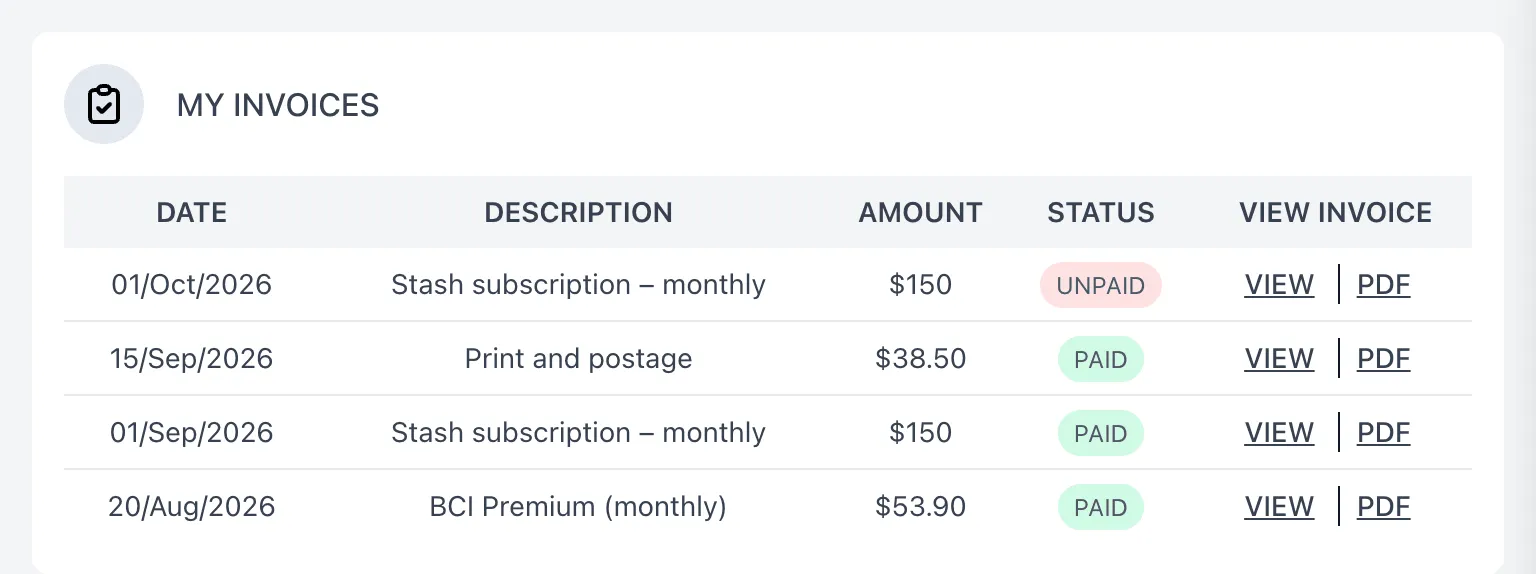
- Find your invoice. Go to My invoices. Each invoice shows its DATE, DESCRIPTION, AMOUNT and STATUS (paid or unpaid). Scroll down the list to load older invoices.
- View or download it. Under VIEW INVOICE, click View to open the invoice online, or PDF to download it.
Upcoming payments
Next payments, above your invoices, shows payments that are coming up. Once a payment is made, its invoice appears in My invoices.
Common questions
I can’t see Billing Centre in the menu
The Billing Centre isn’t available in the Stash mobile app. Log in on a computer or in your web browser. See Using Stash on your phone or tablet.
It says I don’t have any invoices
If you’re on a free trial, or your subscription is paid by your team owner, you won’t have invoices of your own. Ask your team owner for copies, or contact us.
An invoice shows as unpaid
Check your card details are up to date. See Update your card details.
I need help with an invoice
Email support@stashproperty.com.au with the invoice date and amount.