


Most mortgage brokers know their loan book well: who the client is, what they borrowed, the rate and when it was settled. What very few brokers can see is the property behind each loan, and what has happened to it since settlement. Loan book monitoring fills that gap. It watches every client property for changes in value, equity, listings and nearby sales, and turns those changes into reasons to call.
That matters because the next loan usually starts with a property event. A client lists their home. A value rise creates usable equity. A fixed rate rolls off. If you hear about it first, you are the broker who gets the call. If another lender or broker hears first, the client may never come back to you.
This guide covers:
- what loan book monitoring is, and what your CRM can’t see
- how client addresses are matched and enriched with property data
- the equity, tenure and tenancy insights that point to refinance, top-up and next-purchase conversations
- daily opportunities: clients selling, reports opened, equity uplift and purchase anniversaries
- searching your client book in plain English
- sharing live market updates and property reports with borrowers
- how property data and CRM loan data work together
- what the estimates can and can’t tell you
What is loan book monitoring?
Loan book monitoring is the ongoing tracking of the properties that secure a broker’s loans. Each client address is matched to a property record, then watched for changes such as a new value estimate, a listing, a sale nearby or an ownership milestone. The aim is simple: know when something has changed for a client, so you can reach out at the right time with a reason that is relevant to them.
The blind spot in every broker’s CRM
A broker CRM is built to manage clients, applications and loans. It stores names, contact details, loan amounts, rates and settlement dates. It doesn’t store live property data, so after settlement the property behind the loan goes quiet in your system, even while the market moves around it.
That leaves three questions most brokers can’t answer from their CRM alone:
- Which clients have built equity? Values move quietly after settlement, and a client who bought five years ago may now have room for a renovation, an investment purchase or an upgrade.
- Who is selling, or buying again? A listing usually means a new loan is coming, whether that’s a purchase, a bridging loan or a discharge.
- Who should you call this week? With hundreds or thousands of clients, the hard part isn’t knowing that opportunities exist. It’s knowing which ones are live right now.
Annual reviews help, but they run on the calendar, not on what is actually happening to the client’s property. Loan book monitoring flips that around, so the property event prompts the call.
How loan book monitoring works
Stash calls the process wash, rinse and spin. It starts with your existing client list and ends with a ranked list of conversations.
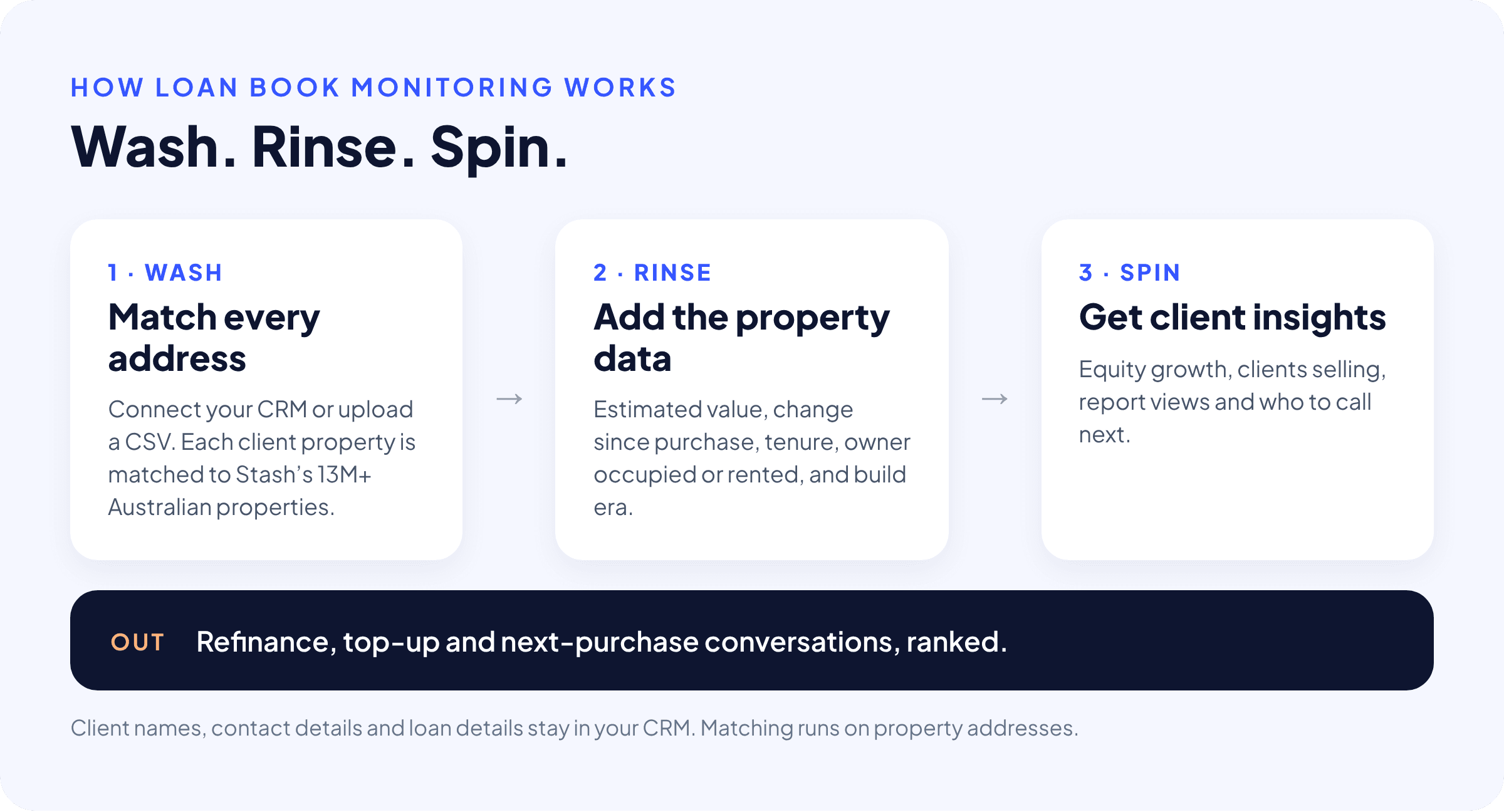
1. Wash: match every address
Connect your CRM or upload a CSV of client properties. Each address is cleaned and matched to the right property record in Stash, which covers more than 13 million Australian properties. Bad addresses and duplicates are flagged, so you end up with one clean record for each client property.
2. Rinse: add the property data
Each matched property is enriched with the data a broker actually uses:
- the current estimated value, and how it has changed since the last sale
- tenure, or how long the client has held the property
- whether it is owner occupied or rented
- property type, bedrooms and build era
3. Spin: get client insights
With the data in place, the book can be sorted and filtered by what matters: equity growth, clients selling, report views and who to call next. The output is a ranked list of refinance, top-up and next-purchase conversations.
Tip: your client data stays in your CRM
Matching runs on property addresses. Client names, phone numbers, emails and loan details stay in your CRM, so you add property intelligence without moving your client records into another database.
See which clients are sitting on equity
Equity is where many of a broker’s best conversations start. The equity increase view takes each client property’s current estimate and subtracts the last sale price, then groups your book by the size of the gain.
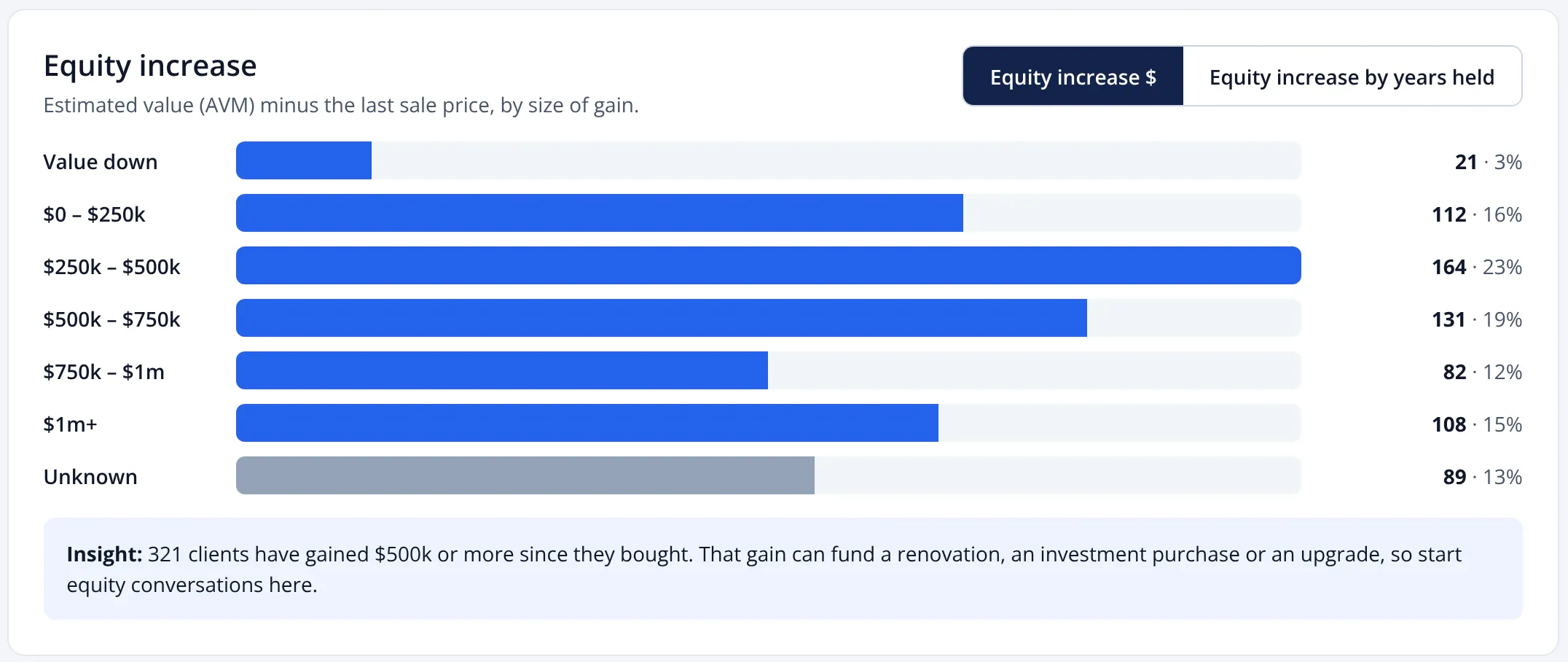
In the example above, 321 clients have gained $500,000 or more since they bought. That gain could fund a renovation, a deposit on an investment property or an upgrade. You can also group the same book by years held, then filter the property list to the band you want, such as gains of $500,000 or more, and start calling.
Equity increase is an estimate of value change. It doesn’t know the loan balance, offsets or redraw. Combined with the loan amount from your CRM, it becomes an estimated equity and LVR (loan-to-value ratio) figure. More on that below.
Know your book, and when fixed rates roll off
Database insights show the shape of your whole client book at a glance, with a short insight under each chart so you know what to do with it.
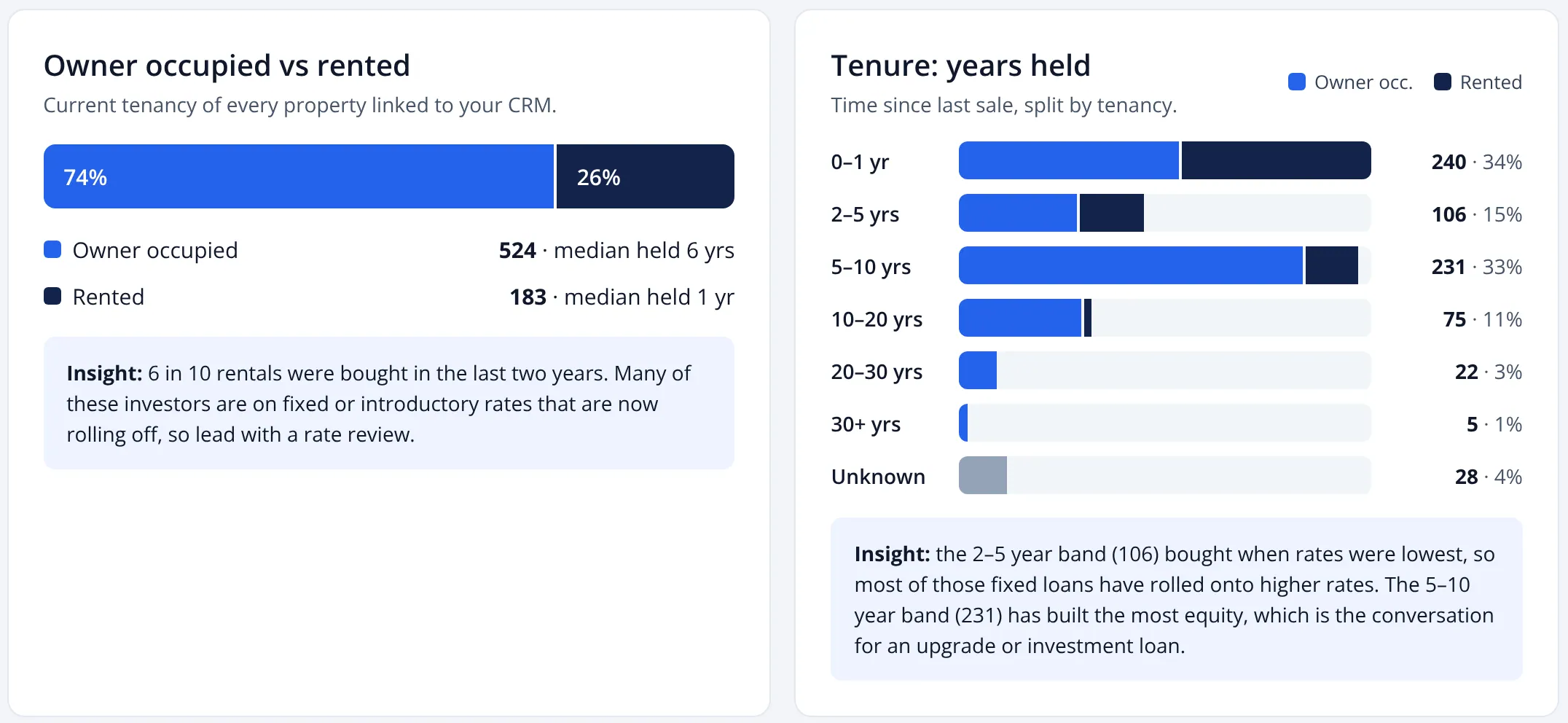
Owner occupied or rented
Tenancy splits your book into owner occupiers and investors. Investors who bought recently are often on fixed or introductory rates that roll off within a few years, so they are natural candidates for a rate review. Owner occupiers who have held for a long time are more likely to be thinking about an upgrade or a renovation.
Tenure: how long clients have held
Tenure groups clients by years since they bought. Two bands tend to stand out:
- 2–5 years. Many of these clients bought or refinanced when rates were at historic lows. The RBA cash rate sat at 0.10% from November 2020 to May 2022, and many fixed loans written then have since rolled onto much higher rates. With the cash rate now at 4.85%, a rate check is an easy conversation to open.
- 5–10 years. This group has usually built the most equity, which makes it the natural place to talk about an upgrade or an investment loan.
The full page also breaks the book down by price estimate, build era, property type and bedrooms. Build era is useful for renovation and construction lending: owners of older homes are more likely to be planning work.
A reason to call, every day
Charts tell you where the opportunities are across the book. The opportunities view tells you which clients to call today, and why.
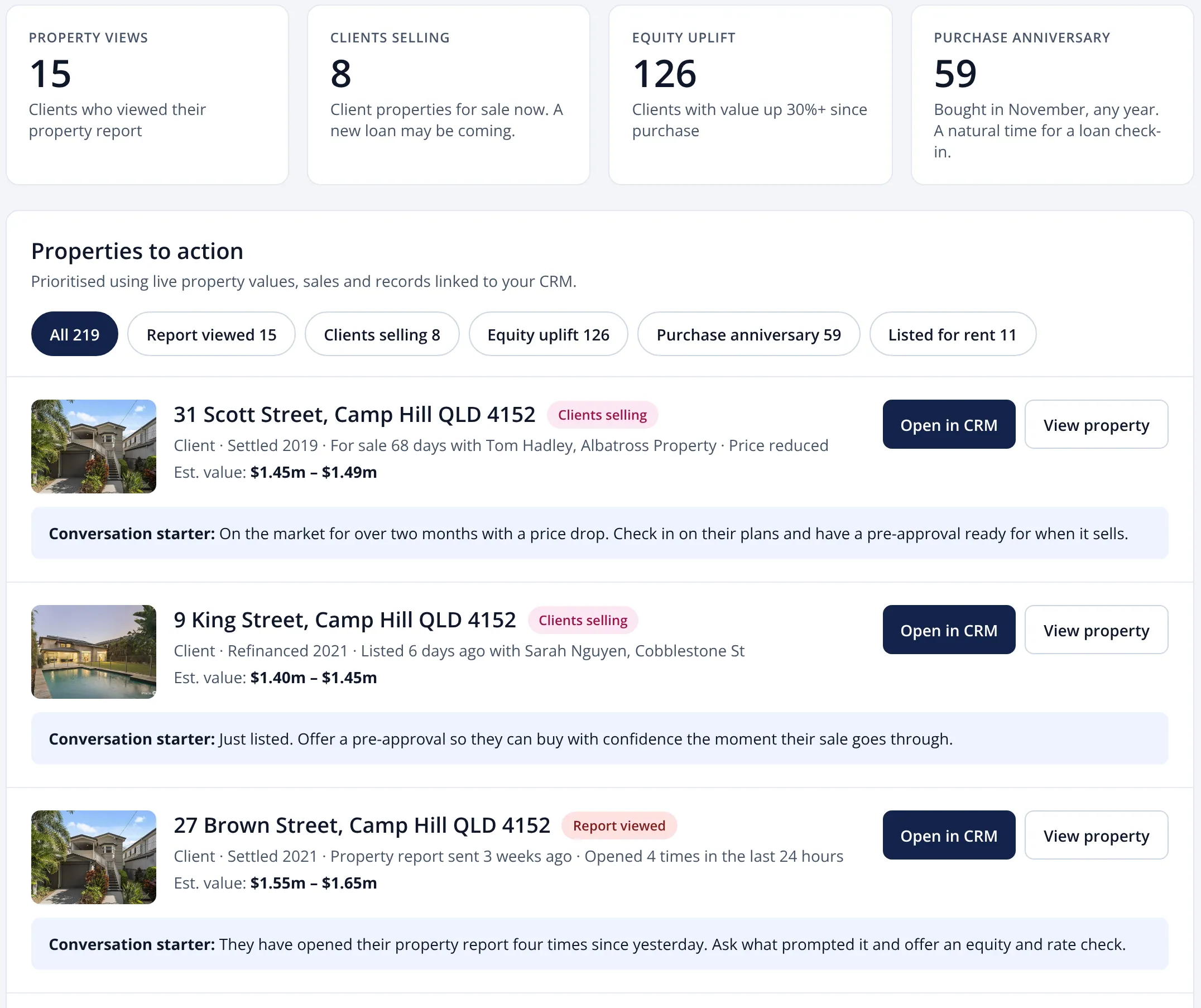
Opportunities are prioritised using live property values, sales and listings, matched to the records linked to your CRM. Each comes with a conversation starter, so you know what to say when you pick up the phone.
| Signal | What it means | The conversation |
|---|---|---|
| Client selling | A client property has been listed for sale. | Check in on their plans and have a pre-approval ready for when it sells. |
| Report viewed | A client has opened the property report you sent, perhaps several times. | Call while it’s front of mind. Ask what prompted the interest and offer an equity and rate check. |
| Equity uplift | The estimated value has risen well above the purchase price. | Talk about using equity for a renovation, an investment purchase or an upgrade. |
| Purchase anniversary | The client bought in this month, in any year. | A natural time for a loan health check. |
| Listed for rent | An owner-occupied property has appeared as a rental. | The client may have moved or bought again. Check the loan still suits how the property is used. |
Ask your client book anything
Property Pipeline is the full list of client properties, with the property data alongside. You can search it in plain English, for example “clients who bought before 2015 and are owner occupied in Camp Hill”, or use filters for value, equity, listing status, build year, zoning and tenancy.
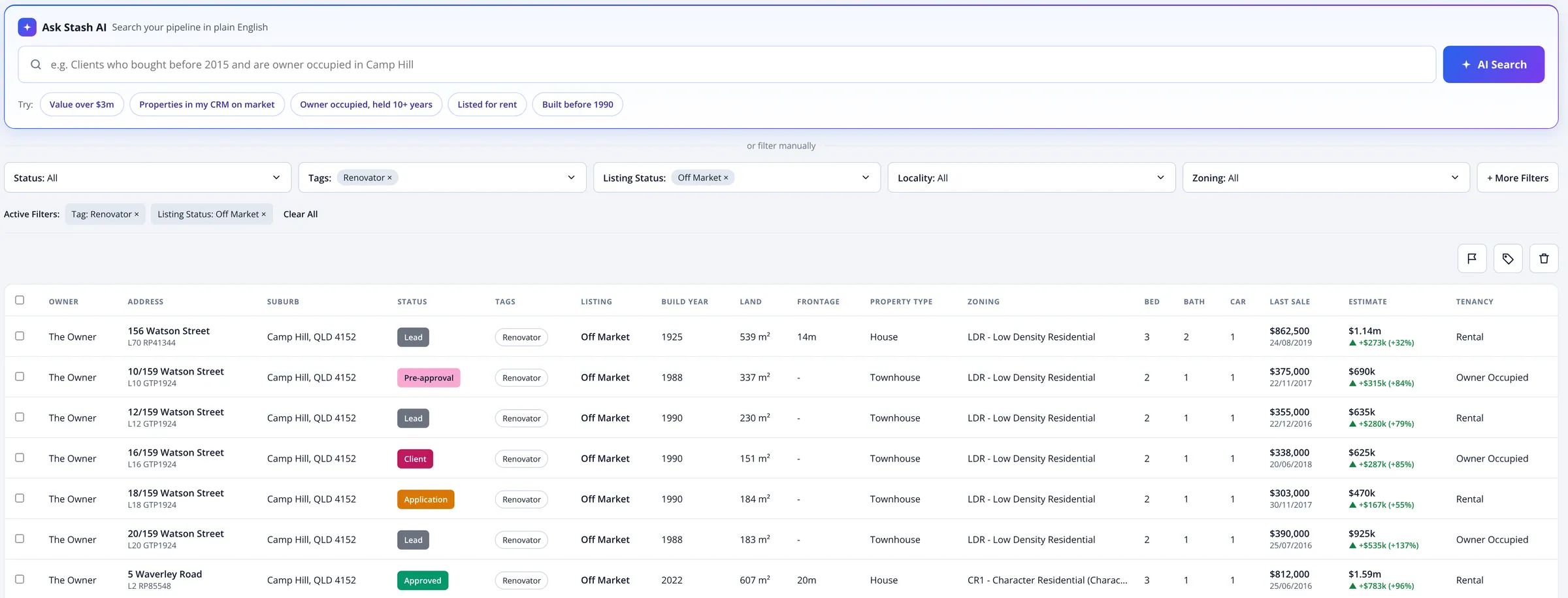
Each property also carries a status, so you can track clients from lead through pre-approval and application to settled. The estimate column shows the current Stash estimate and the change since the last sale. Contact and loan details stay in your CRM; the search runs on the property data.
Share a market update with your borrowers
Most clients hear from their broker when something is needed: a document, a signature, a renewal. A market update gives them something useful instead, and gives you a reason to stay in touch between loans.
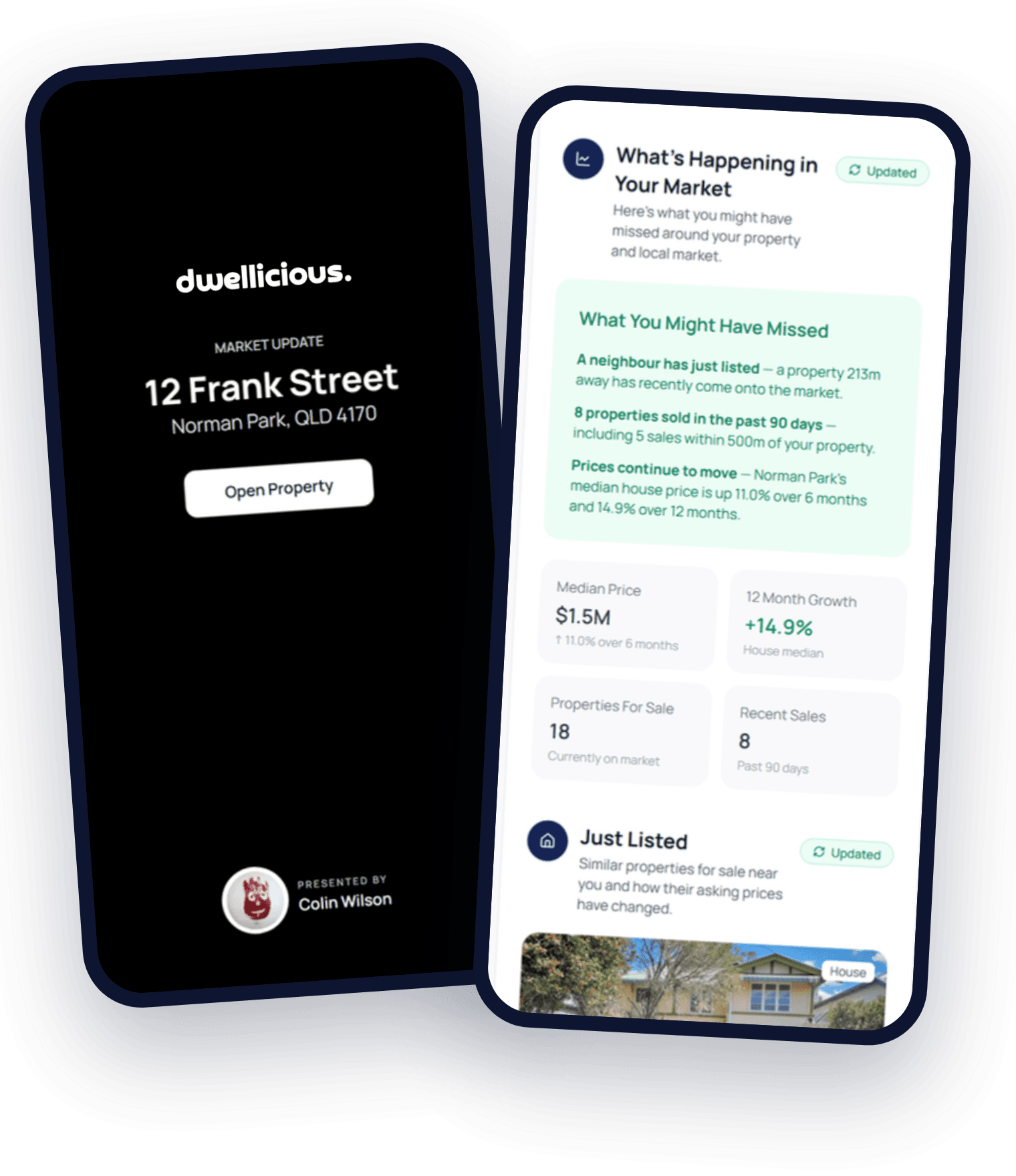
Live Market Updates can cover:
- A property: its estimate, equity and growth, for the owner.
- A suburb: sales, medians and listings, for a client who is still looking.
Updates go out in your brand, by WhatsApp, SMS, email or a link. A suburb update is an easy first touch for pre-approval clients who haven’t found a property yet: it keeps you in the conversation while they search.
Be proactive about refinance with live reports
A live property report is a branded page for each client property that updates as the market moves. Because it stays current, the client can keep coming back to it, and you can see when they do.
- See who opened their report, how often and when.
- Hot, warm and reactivated signals show who to call first.
- Start the refinance conversation before the client starts shopping around.
Insight: engagement is the earliest signal
A client who opens their property report four times in a day is usually thinking about something: selling, renovating, buying again or checking what their home is worth before talking to their bank. That is your cue to call, before another lender gets the conversation.
Property data plus loan data: a loan book that talks
Property data on its own tells you what a home is worth. Loan data on its own tells you what is owed. Put the two together and the loan book starts telling you who needs a conversation.
Stash knows
The property
- Estimated value
- Sales and listings
- Tenure and tenancy
You and your CRM know
Your client
- Loan amount
- Interest rate
- Fixed-rate expiry
Together
A loan book that talks
- Potential equity and LVR
- Alerts when clients list or sell
- Live reports in your brand
Stash brings the property data and your CRM holds the loan details. Connected, you see estimated equity and LVR for each client, get alerts when something changes and send live reports, without leaving the CRM you already use. Stash is starting with SalesTrekker, and other CRMs can connect through the Stash API or a CSV upload.
What the estimates can and can’t tell you
Loan book monitoring is a way to find the right conversations, not a credit decision. It helps to be clear about what each number is:
- The estimate is an automated valuation model (AVM), based on sales evidence. It is a market estimate, not a formal valuation. A lender will still order its own valuation before approving a refinance or top-up.
- Equity increase is value change, not equity. It is the estimate minus the last sale price. Usable equity also depends on the loan balance, offsets, redraw and the lender’s maximum LVR.
- LVR needs the loan amount from your CRM. Without it, Stash can show value change but not LVR.
- Some properties won’t match cleanly. New addresses, rural properties and incomplete records may need checking before you rely on them.
Used this way, the data tells you who to call and what to say. The advice and the lending decision are still yours.
Getting started with loan book monitoring in four steps
1
Connect your book
Upload a CSV of client properties, or connect your CRM.
2
Match and enrich
Every address is matched to a property and given its estimate, tenure and tenancy.
3
Pick a segment
Start with one group, such as clients selling or the 2–5 year tenure band.
4
Start the conversation
Send a live report or market update, then call the clients who open it.
Pricing and availability
Stash for Mortgage Brokers is in early access. Pricing is tailored to your business while it rolls out, and on-market monitoring of your loan book is free for up to 100 properties. Talk to the team for a quote.
Key takeaways
- Your CRM knows the client and the loan, but not what has happened to the property since settlement.
- Loan book monitoring matches each client address to a property and watches it for value changes, listings and nearby sales.
- Equity, tenure and tenancy insights point to refinance, top-up and next-purchase conversations.
- Daily opportunities rank who to call, with a conversation starter for each.
- Live reports and market updates keep you in touch between loans, and show you who is engaged.
- Estimates are market estimates, not valuations. Combine them with loan data from your CRM for equity and LVR.
Frequently asked questions
What is loan book monitoring for mortgage brokers?
It is the ongoing tracking of the properties behind a broker’s loans. Each client address is matched to a property record and watched for changes in value, listings, nearby sales and ownership milestones, so the broker knows when to reach out.
Do I need to move my clients out of my CRM?
No. Matching runs on property addresses, and client names, contact details and loan details stay in your CRM. You can start with a CSV upload or connect your CRM.
Which CRMs does it work with?
Stash is starting with SalesTrekker. Other CRMs can connect through the Stash API, or you can upload a CSV of client properties.
How is equity calculated?
Equity increase is the current Stash estimate minus the last sale price. It shows value change, not usable equity. When the loan amount comes from your CRM, it can be combined into an estimated equity and LVR for each client.
Is the Stash estimate a valuation?
No. It is an automated market estimate based on sales evidence. It helps you decide who to call, but a lender will still order a formal valuation for a refinance or top-up.
How do I know which clients to call first?
The opportunities view ranks clients by live signals: properties listed for sale, reports opened, equity uplift and purchase anniversaries. Live report engagement adds hot, warm and reactivated signals.
Can I send clients updates in my own brand?
Yes. Live Market Updates and property reports go out in your brand, by WhatsApp, SMS, email or a link, and update as the market moves.
Turn your loan book into your next opportunity
See which clients have built equity, who is selling and who to call next.
Screens shown use example data. Stash estimates are automated market estimates, not formal valuations. General information only, not financial or credit advice.