


Updated November 2026: the checklist now lives on the Checklist card of each saved property, with reusable templates and a Checklist page in your property report. We’ve added the current steps below.
Leaving some of your tasks behind and ending up missing some factors in closing a deal? That sounds frustrating.
We all know that working on certain projects always requires time management. To make sure that you haven’t left out any of your tasks, assignments, meetings, etc., you could probably think of creating a to-do list where you can have this all listed which could also be a hassle if you’re doing paperwork.
The same goes with property development professionals where they have to comply with some requirements and gather more data on their prospect property. To make sure that every single factor is delivered, you may need to have a list of them where you can track if you’re already done with all the aspects to consider in pursuing the development.
With the help of modern technologies nowadays, Stash made this possible for you. No need to do the old fashioned way of pen and paper to do your list, hence, you can absolutely do this directly from your Stash account with some prepopulated checklist that you may consider.
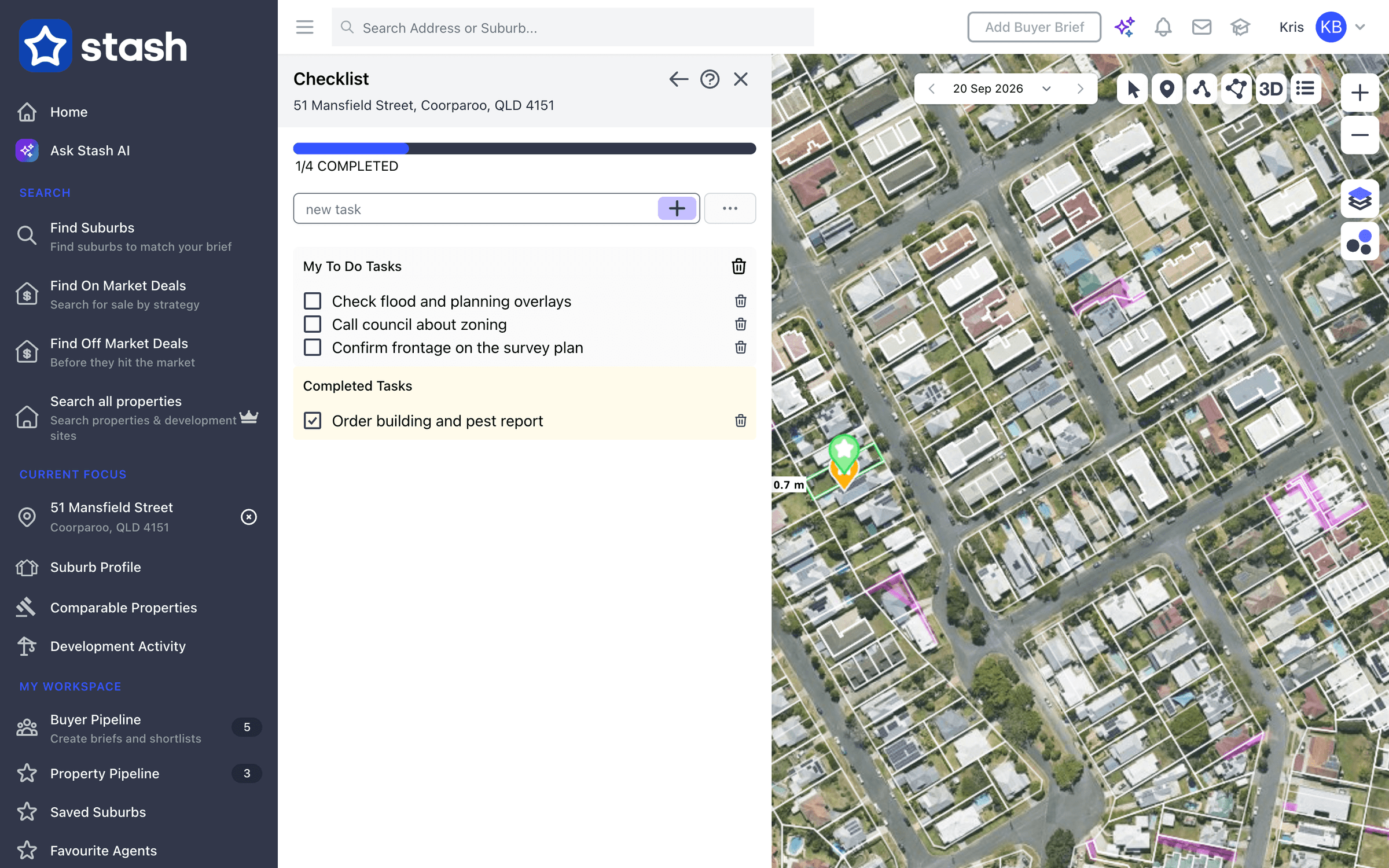
Our new checklist feature will allow you to customise your list at any time depending on your desired preference or on the projects that you’re working on. The checklist helps you stay organised with your research tasks. Create templates for reusable checklists. For example, you might have a different checklist template for subdivision research and a different checklist for townhouse development
Advantages of the Stash Checklist:
- Checklists make it easy to start and stay on track. We have some preloaded or custom-built.
- Organise the tasks that need to be completed.
- Make sure that all tasks are ready to be accomplished.
- Checkbox option to mark those tasks already completed
- Delete some duplicate task/s not needed
- Customise tasks on the checklist
- Can add as many tasks as needed
- Create multiple checklists
How to use the checklist in Stash today
- Open a saved property. The checklist is only available for properties in your pipeline, so stash the property first if it isn’t saved.
- Find the Checklist card on the property page and click View checklist.
- Add tasks. Type in the new task box and press Enter, or, when the list is empty, choose a template from Populate from template to add all its tasks at once. Stash includes starter templates you can use or edit.
- Tick tasks off. Click a task to move it to Completed Tasks. The progress bar on the card updates as you go.
- Save your own templates. Click the … button next to the new task box to manage templates, for example one for subdivision research and another for townhouse development.
When a property has checklist tasks, your property report includes a Checklist page too. If the Checklist card shows a crown icon, it isn’t included in your plan. See Keep track of tasks with the checklist, and Set up auto reminders to be prompted when a property is due for follow-up.
What a great way to start your property search journey! We’d love to hear your feedback on this and how we can do better in providing an excellent customer experience to our users.
What are you waiting for? Be the first one to try this on our new version and start a free trial, no credit card needed.
Happy Stashing!