

Updated November 2026: development applications now sit on the Development Activity page in Stash, with radius, suburb and time-period filters. We have updated the steps below and added how long a DA takes in NSW.
What is a DA and why are they important?
Whether you already know what a DA is or if you have no idea what we’re talking about, either way, your life is made so much easier with our super fast Development Application access via Stash.
Put simply, a Development Application (DA) is a request for formal permission to develop a property. The type of development including design, location and other structural details must be outlined and submitted for local council approval. Once approved, a Development Approval is a legal document that guides all future advancements.
How long does a DA take?
It depends on the council, the state and how complex the proposal is. In NSW, the average DA assessment time across the state was 84 days, based on figures to 31 May 2026, and the NSW Government's statewide target for 2026 is 90 days (Local Government NSW). Simpler projects that meet set standards can often use complying development instead, which averaged 20 days in NSW in September 2026 (NSW Planning performance data). Other states have their own timeframes, so check your council's website for current processing times.
What can I learn from viewing Development Applications?
It is vital you’re aware of any pre-existing DA’s for a property you are considering, along with understanding what development approvals or declines have occurred in surrounding areas.
Through this process of easily viewing previous DA’s within Stash, you’ll learn if there is a history of developments that have typically been approved. For example, previous development approvals for town houses or land subdivisions shows this type of development may be approved again for the nearby property you’re exploring.
You’ll also learn what types of developments have not been approved – for example, high rise apartments or high rise office buildings.
Finding DA’s was traditionally a timely process of scrolling through individual local council websites to hunt down relevant information for your property in question. Stash technology takes the time out of this process.
How to check Development Applications inside Stash
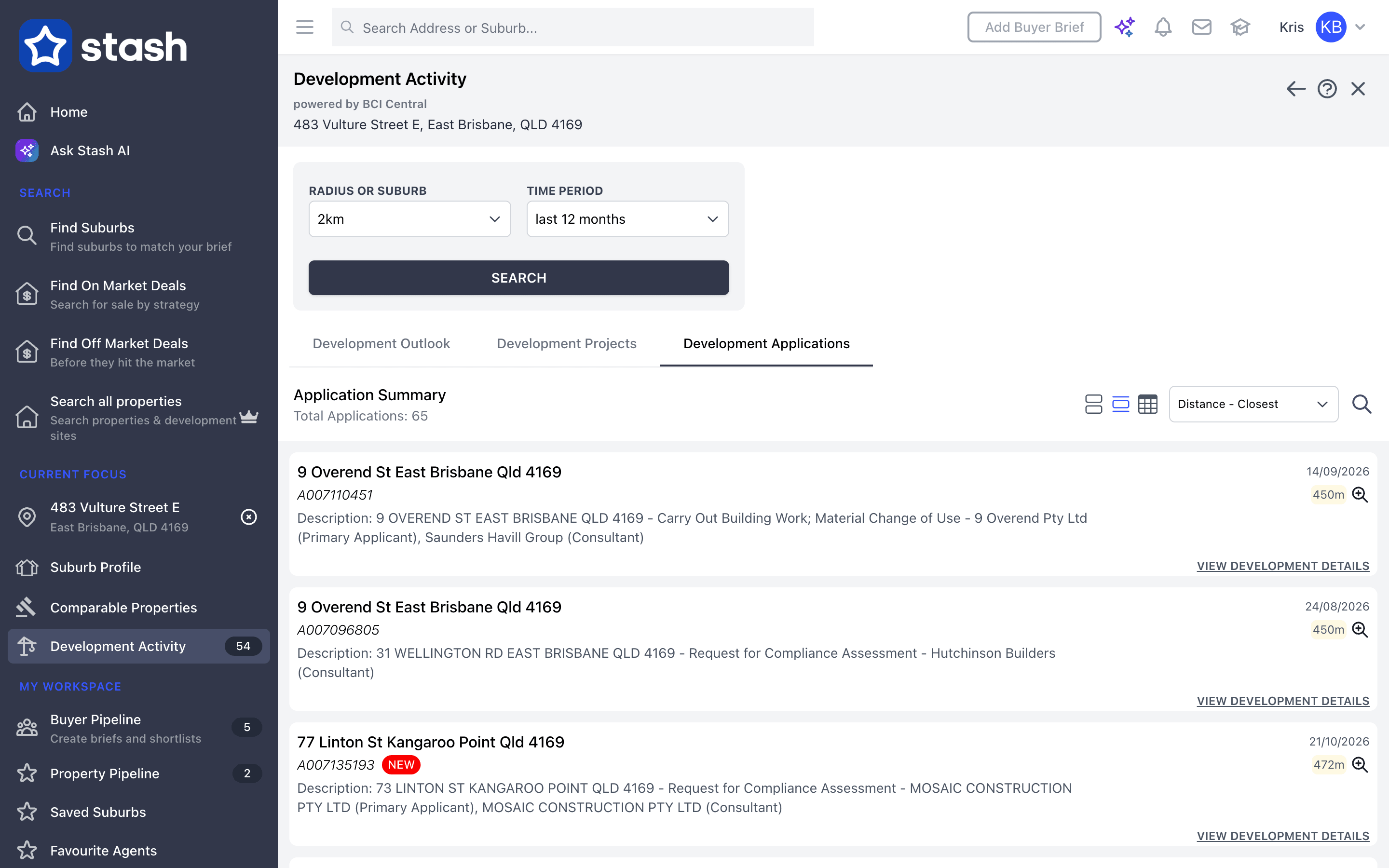
- Open your target property: search for the address, click it on the map, or open it from your Property Pipeline.
- Go to the Planning Insights tab. The Development Applications card shows how many applications were found for the property and within 2km.
- Click View development applications to open Development Activity on the Development Applications tab. You can also open Development Activity from the side menu, under CURRENT FOCUS.
- Under RADIUS OR SUBURB, choose 1km to 5km around the property, or the whole suburb. Pick a Time period (last 6, 12 or 24 months) and click SEARCH. Sort by distance or date, or search by a keyword such as dwelling or Reconfigure.
- Click an address or View Development Details to open the application on the council's website, where you can see the full record and documents. A red NEW label means it was received in the last 30 days.
Full steps are in our Help Centre: View recent development applications. For larger developments, with their stage, value and contacts, see Check development projects (a paid add-on). Development applications aren't included on every plan, so check our plans.
Submitting Development Applications
Stash doesn't lodge DAs for you, but finding previous applications quickly can help you prepare your own.
Submitted Development Applications can be a time consuming process, however if you view previous surrounding applications to gauge what is likely to be approved, and follow a methodical process, you will be capable of successfully compiling what is required and fast.
It is also important to note, if a development application is declined it is likely to have failed to comply with one or more of the relevant controls local councils set for certain areas. However the more you review previous applications, the more likely you’ll be aware of these controls, giving your own Development Applications the best chance for success.
Stash collects DAs from councils as they publish them, so the newest applications can take time to appear. Always check the council record for the current status, and get advice from a town planner for your own application. General information only, not planning advice.
Should you require further assistance, please e-mail us at support@stashproperty.com.au or reach us through our live chat at stashproperty.com.au and we will be happy to assist you.
We always appreciate your feedback.
Happy Stashing!